
Ever wish there was one online resource to answer all your questions? myPLNU was created to serve as a central resource hub — helping students access essential academic services, joining and staying connected to their communities, and finding support with campus resources. From viewing academic plans to seeing what's for dinner at the cafeteria, myPLNU brings a variety of resources and communities all in one place.
What is myPLNU?
The purpose of myPLNU is a digital platform that serves as a central hub to assist in student success, provide academic resources, and create a place of community. As a college student, it has been researched that 65% of students use anywhere between 6-15 digital apps on a daily basis. myPLNU is the simplification of the possibly overwhelming amount of resources a student needs. As a central hub, myPLNU can connect with students' Canvas (academic portal), Workday, Gmail, and many more accounts allowing students to quickly find what they need at the touch of their fingertips.
Who can use myPLNU?
This digital resource is not limited to being a resource hub, but in fact aids in developing a way to enhance the community as a whole. This all-in-one app provides connections to be more accessible whether students are in-person or online. Those who have access to myPLNU include:
- Traditional Undergraduate Students
- Graduate and Professional Studies Students
- Accelerated Undergraduate Students
- Employees (Faculty and Staff)
How myPLNU is forming a digital community
While a student at PLNU, you’ll discover a wide range of student groups to meet peers with common interests or areas of study. Popular groups currently active include:
Traditional Undergraduate
- Student-run Clubs
- PL Wellness
- Study Abroad programs
- Student Veterans of America PLNU
Graduate and Professional Studies
- Student Service Hub
- Program-specific groups (i.e. Child Development, Kinesiology, etc.)
- First Generation Students
- Alpha Sigma Lambda Chi Tau (Honors Programs)
What is the Difference between myPLNU, Canvas, and Workday?
Although myPLNU is a central hub for student resources, students still need access to their necessary digital platforms. myPLNU is best served as a starting point that externally links to essential platforms for students, such as Canvas or Workday.
| Platform | Purpose |
|---|---|
| myPLNU | myPLNU is a central hub for all student resources for campus life, scheduling, and the dashboard for external resources. |
| Canvas | Canvas is the digital platform for all academic activities. Students can use Canvas for activities such as submitting work, taking tests/quizzes, or even receive updates from professors. |
| Workday | Workday is your personalized website as a part of PLNU. Students use Workday for a wide range of activities such as accepting financial aid, applying for on-campus student jobs, or selecting classes. |
New student to-dos in myPLNU
When a new student downloads myPLNU, you’ll want to get set up to get the most out of the digital app. A detailed myPLNU experience can lead to a personalization of your experience, easier peer connection, and better campus engagement.
Step 1:
If you would like to communicate with clubs, ministries, or peers, you may want to enter personal information, so others know a little more about you. Here you can enter information such as your graduation year, hometown, hobbies, or even any work experience.
Step 2:
You’ll then want to customize how you receive notifications. As you join clubs, organizations, or events the managers will send regular updates to those on the sign-up list. If you want to hear about them, make sure to have the notifications turned on!
Step 3:
Get connected! Look for organizations or events on campus you may be interested in attending and sign up to receive updates.
Step 4:
The best method to navigate through myPLNU is the search bar — as you can quickly find what you are looking for, rather than attempting to scan the whole app for what you need.
Step 5:
Finally, familiarize yourself with the resources available. In myPLNU you can access widgets — giving you quick access to important student services such Canvas, Gmail, Workday, academic calendars, chapel schedules, courses, grades, academic plan, etc.
__________
Who are you called to be?
Pursue your purpose at PLNU.
__________
A quick guide to myPLNU
Sidebar:
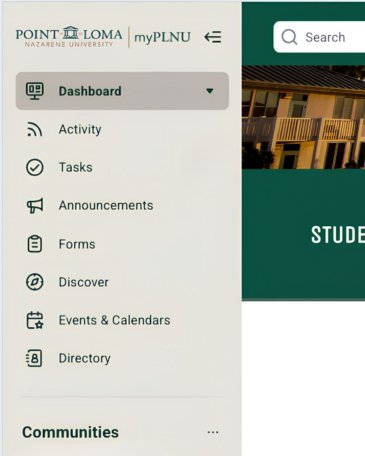
The sidebar is a great tool to navigate throughout the app to find helpful resources. The Dashboard tab, which will include many of the external links students will need on a daily basis, is the homepage for quick access. The Announcements tab is where you may find any updates to the groups you are signed up for. If a club meeting, for example, has been cancelled, then you’ll likely hear about it here. Other resources include academic resources, student life, career services, or even checking what is on the menu at the Dining Hall on campus.
Widgets:
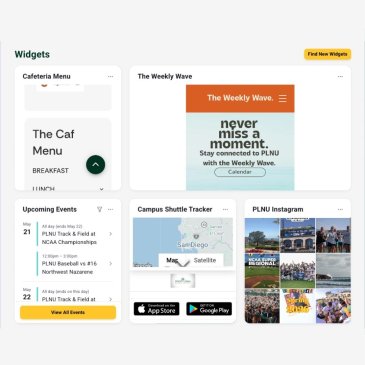
In the main dashboard, you’ll have widgets appear. This will occur once you sign up for a specific group on campus or if you personalize your dashboard with widgets such as upcoming events, the Weekly Wave calendar, or tracking the campus shuttle!
Search Bar:
Quickly navigate to exactly what you are looking for without the need to scroll through the resource list in the sidebar.

Join the PLNU Community
Whether you are looking for something tasty to eat in the Dining Hall, or wanting to find the schedule for a resume writing workshop in Career Services, myPLNU is bound to support your college experience. You’ll find that support every step of the way at PLNU — we’re committed to your academic, spiritual, and personal growth. Discover how you can find a place of belonging, while making an impact on your career.
Frequently Asked Questions
Do I need myPLNU if I already use Canvas?
myPLNU is best used as a central hub for campus life, rather than your academics. Although you do not need myPLNU to access Canvas, it is an easy way to have all of your essential apps in one place. As myPLNU is separate from Canvas, you’ll need to use myPLNU to know what is going on around campus and what resources are available to make the most out of your college experience.
Can I use myPLNU on my phone?
Absolutely. You can download it through your phone’s app store and can use it at the touch of your fingertips to stay up to date with what is happening around campus.
Where do I find my tuition balance?
You can either search for “tuition balance” in the search bar or navigate to University Resources and locate Student Financial Services. Here can find the link to see your tuition balance.
How do I join a club?
Joining a club is as simple as searching for the club’s name, and navigating to the top right corner, and clicking on
Join Community. You’re all set! Make sure to turn on notifications to receive updates about the clubs you decide to join!
How do I find chapel information?
You can navigate to the search bar, select Pages, find the drop down menu under Student Life, and select Chapel. Here you can add the chapel schedule to your Gmail calendar or just stay up to date through myPLNU.
Where on myPLNU can I find my academic plan?
You’ll want to navigate to the sidebar and select the Academic Resources drop down menu, select Office of Records, scroll down to academic requirements, and finally select Program Requirements. This can also be searched for in the search bar!